Security
Remediation
Task Control
B2B SaaS
01
Scattered Actions
02
No Priority Signals
03
No Filtering
04
No Ownership
Primary Persona
SOC Analyst
Key Features
• Business-weighted priority
• App criticality rating
Job to be done
"Pick up where I left off, resolve subtasks, track progress - without losing context."
CISO
Needs a high-level security posture overview. Scans risk by category.
Key Features
Job to be done
"See organizational risk at a glance - open, resolved, and where we stand."
App SOC
Key Features
• Filter by specific application
• Filter by task category
• Quick inline actions
Job to be done
"Show me only my app's tasks, let me fix it quickly, and get it off my plate."

Competitor
✓ What worked
✕ What didn't work
+ Our advantage
Competitor X
Single-page views, combined filters, and one-click remediation
Work still starts from findings and different context pages
A central Action Center that consolidates tasks, execution, and tracking
Competitor Y
Direct 'Things to do' language and guided playbooks that clarify what to do now
Large cards work for a small number of actions, but not for dozens or hundreds of tasks
A scannable, filterable list with clear actions at scale
Competitor Z
Grouping by Missions with owner, effort, progress, and expected risk impact
Structure fits campaigns and broad goals, less suited for managing individual daily tasks
Combining focused tasks with grouping by root cause or outcome

01
02
03
Cards View
✕
Rejected
- Visually rich but low density
- Good only for small task volumes
- Extremely hard to scan at scale
- No efficient bulk action capability

Table View
✓
Chosen - Phase 1


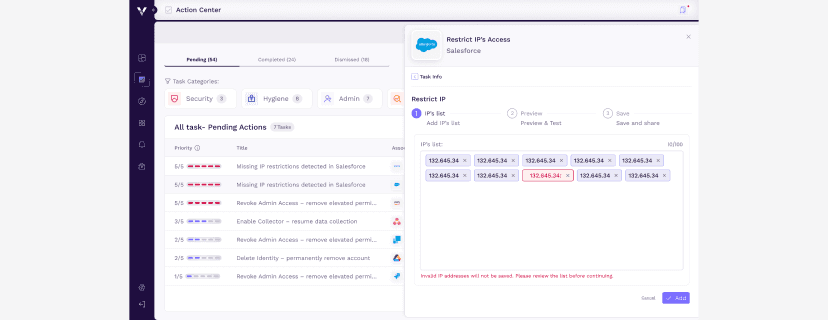


Snooze ≠ Dismiss
A snoozed task returns automatically. The security gap doesn't disappear - it's deferred to a date, but will keep coming back until resolved.
Cross-Tab Presence
One task can appear across Pending, Completed, and Snoozed tabs simultaneously - each showing relevant subtasks for that state.
Task Lifecycle
Every subtask flow accounts for start → progress → complete. Users can leave and return without losing context or progress.

Task Level- Business-weighted scoring
Apps rated by criticality at onboarding, auto-weighting task priority.
Subtask Level- Color dot + hover detail
Subtasks show colored priority dots. Full detail on hover — no clutter.
Roll-up- Priority cascades up
Task priority computed from subtasks. Resolving urgent ones impacts the score.

Users- Daily Active Centerpiece
Customer Success- Accelerated Onboarding
Sales- The Go-To Demo
Business- Strategic AI Enablement
01
02
03

© 2026 Roni Lorentz