Traffic Inspector
Traffic Inspector
Turning fragmented AI-agent traffic into a traceable investigation story.
Turning fragmented AI-agent traffic into a traceable investigation story.
AI Agents
Investigation
Traffic Analysis
Cross-System Tracing
The Problem- Visibility into traffic, without agent context
The Problem- Visibility into traffic, without agent context
01
Unknown Triggers
Security teams couldn't identify who initiated the AI agent or what triggered its cross-system activity across multiple applications.
Security teams couldn't identify
who initiated the AI agent or what
triggered its cross-system activity
across multiple applications.
Security teams couldn't identify who initiated the AI agent or what triggered its cross-
system activity across multiple applications.
02
Identity Fragmentation
A single agent action could span multiple identities and systems, making it impossible to trace the full chain of operations back to a source.
A single agent action could span
multiple identities and systems,
making it impossible to trace the full
chain of operations back to a source.
A single agent action could span multiple identities and systems, making it impossible
to trace the full chain of operations back to a source.
03
No Activity Sequence
Traffic events appeared as isolated rows with no timeline connecting them into a coherent investigation narrative across applications.
Traffic events appeared as isolated
rows with no timeline connecting them
into a coherent investigation narrative
across applications.
Traffic events appeared as isolated rows with no timeline connecting them into a coherent
investigation narrative across applications.
04
No Agent Context
Even when suspicious traffic was flagged, there was no way to see which agent was involved, what identity it used, or what it accessed.
Even when suspicious traffic was flagged, there was no way to see which agent was involved, what identity it used, or what it accessed.
Even when suspicious traffic was flagged, there was no way to see which agent was
involved, what identity it used, or what it accessed.
The data was there- but the story was missing. I designed a system that connects fragmented traffic events into a traceable agent investigation.
The data was there- but the story was missing.
I designed a system that connects fragmented traffic events into a traceable
agent investigation.
User Personas - Three audiences, one investigation tool
User Personas
User Personas -
Three audiences, one investigation tool
Primary Persona
SOC Analyst
Investigates suspicious AI traffic daily. Traces anomalies from volume spikes to specific conversations and payloads.
Key Features
• Timeline-first traffic investigation
• Timeline-first
traffic investigation
• Conversation payload viewer
• Has Conversation filter toggle
Job to be done
"Find the suspicious spike, trace it to the conversation, and determine if data was leaked."
"Find the suspicious spike, trace it to the conversation, and determine if
data was leaked."
CISO
Needs organizational overview of AI traffic volume, trends, and application exposure without deep investigation.
Key Features
• Traffic volume dashboard overview
• Traffic volume
dashboard overview
• Application-level traffic summary
• Application-level
traffic summary
• Peak activity and trend indicators
• Peak activity and
trend indicators
Job to be done
"Understand our AI traffic exposure at a glance - volumes, applications, and trends."
Compliance Officer
Focused on specific policy violations and audit trails for AI tool usage across the organization.
Focused on specific policy violations and audit trails for AI tool usage across
the organization.
Key Features
• Filter by application and department
• Filter by application
and department
• Conversation export for compliance audits
• Conversation export
for compliance audits
• Timeline-based audit trail
Job to be done
"Show me which employees discussed sensitive data with AI tools and when it happened."
"Show me which employees discussed sensitive data with AI tools and when
it happened."
Design Decisions
Design Decisions
The result: A dedicated investigation layer that traces suspicious agent traffic across identities and applications- connecting what AI Ecosystem discovered to what actually happened.
The result: A dedicated investigation layer that traces suspicious agent traffic across identities and applications- connecting what AI Ecosystem discovered to what actually happened.
Traffic-to-agent tracing
Traffic-to-agent tracing
Traffic Inspector connects network-level signals directly to agent activity timelines, eliminating the gap between detection and understanding.
Traffic Inspector connects network-level signals directly to agent activity timelines, eliminating the gap between detection and understanding.
Timeline-first investigation
Timeline-first investigation
Volume peaks in the timeline highlight moments of significant agent activity, giving analysts an entry point before diving into event details.
Volume peaks in the timeline highlight moments of significant agent activity, giving analysts an entry point before diving into event details.
Activity reconstruction
Activity reconstruction
Isolated traffic events are connected into a chronological agent activity timeline showing triggers, identities, applications, and sessions.
Isolated traffic events are connected into a chronological agent activity timeline showing triggers, identities, applications, and sessions.
Contextual investigation panel
Contextual investigation panel
Side-by-side layout keeps traffic metadata visible alongside the agent conversation, preserving investigative context throughout the flow.
Side-by-side layout keeps traffic metadata visible alongside the agent conversation, preserving investigative context throughout the flow.
Progressive disclosure
Progressive disclosure
AI Conversation capabilities are revealed only when relevant — through filters, managed columns, and contextual entry points rather than default UI clutter.
AI Conversation capabilities are revealed only when relevant — through filters, managed columns, and contextual entry points rather than default UI clutter.
The Product's Core Investigation Layer & Entry Points
Entry Points
The Entry Points
Investigations didn't always start in Traffic Inspector. Users could arrive from different areas of the system - Action Center tasks, AI Ecosystem entities, Alerts, Identity pages, Dashboard anomalies, Discovery Map connections, or direct navigation. Each entry preserved relevant context through pre-applied filters, identity, application, or time range.
Investigations didn’t always start in Traffic Inspector. Users could arrive from different areas of the system - Action Center tasks, AI Ecosystem entities, Alerts, Identity pages, Dashboard anomalies, Discovery Map connections, or direct navigation. Each entry preserved relevant context through pre-applied filters, identity, application, or time range.
01
Alert
Opening an alert notification or alert detail. Arrives with the alert's time window, severity, and related entities pre-filtered.
Opening an alert notification or alert detail. Arrives with the alert’s time window, severity, and related entities pre-filtered.
02
Action Center
Following a task or action item from the Action Center. Arrives with the task's associated filters — identity, app, and time range.
Following a task or action item from the Action Center. Arrives with the task’s associated filters — identity, app, and time range.
Following a task or action item from the Action Center.
Arrives with the task's associated filters-identity, app,
and time range.
03
Discovery Map
Selecting a connection or node on the Discovery Map. Arrives filtered by the specific entities and communication paths shown on the map.
Selecting a connection or node on the Discovery Map. Arrives filtered by the specific entities and communication paths shown on the map.
04
AI Ecosystem
Drilling into an AI entity from the Ecosystem view. Arrives with the specific AI agent or model pre-filtered, showing only its traffic.
Drilling into an AI entity from the Ecosystem view. Arrives with the specific AI agent or model pre-filtered, showing only its traffic.
05
Human Identity
Clicking through from a human identity profile. Arrives filtered to show all traffic associated with that specific user identity.
Clicking through from a human identity profile. Arrives filtered to show all traffic associated with that specific user identity.
06
Non-Human Identity / AI Agent
Non-Human Identity / AI Agent
Clicking through from an NHI or AI Agent profile. Arrives filtered to that entity's traffic with full identity context preserved.
Clicking through from an NHI or AI Agent profile. Arrives filtered to that entity’s traffic with full identity context preserved.
07
Side Navigation
Direct access from the main menu. User arrives at a clean, unfiltered view and must apply their own filters to begin investigating.
Direct access from the main menu. User arrives at a clean, unfiltered view and must apply their own filters to begin investigating.
08
Dashboard
Clicking an anomaly or metric on the Dashboard. Arrives with pre-applied time range and relevant service filters from the dashboard context.
Clicking an anomaly or metric on the Dashboard. Arrives with pre-applied time range and relevant service filters from the dashboard context.
Investigation Flow
Investigation Flow
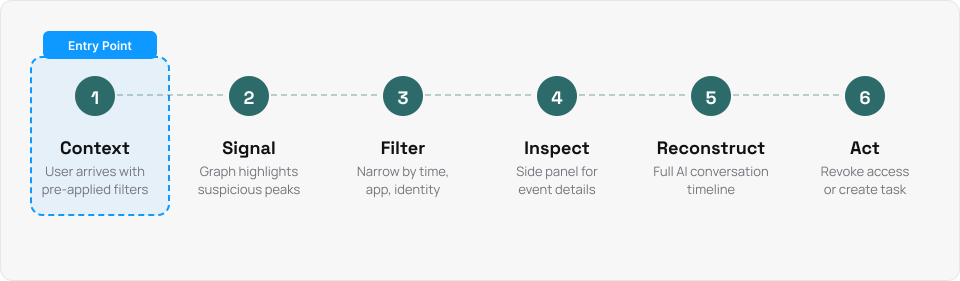
Context → Signal → Filter → Inspect → Reconstruct → Act. The user arrives with context, identifies a peak or significant period in the graph, narrows the time range and applies filters, locates agent-related traffic, opens the AI Conversation, understands who triggered the agent and where it went, then shares findings or restricts unwanted access.
Context → Signal → Filter → Inspect → Reconstruct → Act.
The user arrives with context, identifies a peak or significant period in the graph, narrows the time range and applies filters, locates agent-related traffic, opens the AI Conversation, understands who triggered the agent and where it went, then shares findings or restricts unwanted access.
Context → Signal → Filter → Inspect → Reconstruct → Act.
The user arrives with context, identifies a peak or significant period in the graph, narrows the time range and applies filters, locates agent-related traffic, opens the AI Conversation, understands who triggered the agent and where it went, then shares findings or restricts unwanted access.

Decision- Show AI Conversation Column By Default?
Decision
Decision- Show AI Conversation
Column By Default?
AI Conversations were only a small part of all traffic. If the column appeared by default, most rows would show 'No' or a disabled state, taking up space in an already dense table. We chose Progressive Disclosure- the column is available through Manage Columns, a dedicated filter shows only events with AI Conversations, and contextual entries from other parts of the system open the screen with filters already active.
AI Conversations were only a small part of all traffic. If the column appeared by default, most rows would show ‘No’ or a disabled state, taking up space in an already dense table. We chose Progressive Disclosure- the column is available through Manage Columns, a dedicated filter shows only events with AI Conversations, and contextual entries from other parts of the system open the screen with filters already active.

Example of a filtered entry session0when a user arrives from another area in the system (e.g. Alert, AI Ecosystem, Identity page), the view opens pre-filtered. The conversation timeline acts as an evidence indicator, showing exactly what the user sees based on the context they entered with.
Example of a filtered entry session0when a user arrives from another area in the system (e.g. Alert, AI Ecosystem, Identity page), the view opens pre-filtered. The conversation timeline acts as an evidence indicator, showing exactly what the user sees based on the context they entered with.

Adapting the Plan- When Data Changes the Design
Adapting the Plan- When Data Changes the Design
Adapting the Plan-
When Data Changes the Design
We originally planned to show a summary above each conversation. When the data turned out to be unavailable, we had to adapt- instead of a written summary, we showed the chain of applications that communicated during the session. This gave analysts enough signal to understand the request, spot sensitive data flow, and decide where to dig deeper. A reminder that even well-planned designs sometimes need to shift when data constraints surface- and that a creative alternative can still deliver real value.
We originally planned to show a summary above each conversation. When the data turned out to be unavailable, we had to adapt- instead of a written summary, we showed the chain of applications that communicated during the session. This gave analysts enough signal to understand the request, spot sensitive data flow, and decide where to dig deeper. A reminder that even well-planned designs sometimes need to shift when data constraints surface- and that a creative alternative can still deliver real value.
We originally planned to show a summary above each conversation. When the data turned out to be unavailable, we had to adapt- instead of a written summary, we showed the chain of applications that communicated during the session. This gave analysts enough signal to understand the request, spot sensitive data flow, and decide where to dig deeper. A reminder that even well-planned designs sometimes need to shift when data constraints surface- and that a creative alternative can
still deliver real value.

Closing the Loop- From Evidence to Action
Closing the Loop- From Evidence to Action
The investigation doesn't end with identifying suspicious activity. From the conversation timeline, analysts can escalate findings directly to the Action Center- creating a review task that captures all relevant context: the agent involved, linked identities, affected services, and the full session evidence.
The investigation doesn’t end with identifying suspicious activity. From the conversation timeline, analysts can escalate findings directly to the Action Center- creating a review task that captures all relevant context: the agent involved, linked identities, affected services, and the full session evidence.
Identity Investigation- Drilling Deeper
Identity Investigation-
Drilling Deeper
Each identity linked to the conversation is clickable- opening a dedicated side panel for that specific identity. From there, analysts can review the identity's full activity history, access patterns, and related sessions across the system, whether it's a human user or a non-human agent.
Each identity linked to the conversation is clickable- opening a dedicated side panel for that specific identity. From there, analysts can review the identity’s full activity history, access patterns, and related sessions across the system, whether it’s a human user or a non-human agent.

Action Center - Review Task
Action Center - Review Task
The task is created beforehand in the Action Center and guides the user directly to the conversation side panel — providing a clear starting point for the investigation with all the relevant context already in place.
The task is created beforehand in the Action Center and guides the user directly to the conversation side panel- providing a clear starting point for the investigation with all the relevant context already in place.

The Impact
The Impact
Users- Evidence-Based Investigation
Users-
Evidence-Based Investigation
Gave security teams clear evidence to identify unwanted agent access- replacing manual log parsing with a readable activity narrative.
Gave security teams clear evidence to identify unwanted agent access- replacing manual log parsing with a readable activity narrative.
Product- Unified Investigation Layer
Product-
Unified Investigation Layer
Connected AI Ecosystem, Action Center, Alerts, Identities, and Discovery into one investigation flow.
Connected AI Ecosystem, Action Center, Alerts, Identities, and Discovery into one investigation flow.
Sales- Visual Demo Moment
Sales-
Visual Demo Moment
Agent activity reconstruction became a key demo moment- making AI security value tangible to prospects in minutes.
Agent activity reconstruction became a key demo moment- making AI security value tangible to prospects in minutes.
Business- AI Security Positioning
Business-
AI Security Positioning
Positioned Vorlon as a platform that doesn't just detect AI agents- but shows what they actually do.
Positioned Vorlon as a platform that doesn’t just detect AI agents- but shows what they actually do.
What I Learned
What I Learned
01
Filtered entries keep investigators in flow
Filtered entries keep investigators in flow
Contextual entries with pre-applied filters eliminated repetitive setup and kept the gap between signal and evidence as short as possible.
Contextual entries with pre-applied filters eliminated repetitive setup and kept the gap between signal and evidence as short as possible.
02
Advanced features don't need to be default
Advanced features don’t need to be default
AI Conversations appeared only when relevant- through filters, managed columns, and contextual entries — keeping the core experience clean.
AI Conversations appeared only when relevant- through filters, managed columns, and contextual entries- keeping the core experience clean.
AI Conversations appeared only when relevant- through filters, managed columns, and contextual entrie- keeping the core experience clean.
AI Conversations appeared only when relevant- through filters, managed columns, and contextual entries- keeping the core experience clean.
AI Conversations appeared only when relevant- through filters, managed columns, and contextual entries- keeping the core experience clean.
03
Partial data becomes evidence when organized
Partial data becomes evidence when organized
We showed observable activity- triggers, identities, apps, and timing and organized it into a timeline investigators could trust and act on.
We showed observable activity- triggers, identities, apps, and timing- and organized it into a timeline investigators could trust and act on.
We showed observable activity- triggers, identities, apps, and timing and organized it into a timeline investigators could trust and act on.
04
A good timeline supports both scanning and depth
A good timeline supports both scanning and depth
Collapsed state enabled quick triage at a glance. Expanded state revealed full forensic detail- both modes in one component.
Collapsed state enabled quick triage at a glance. Expanded state revealed full forensic detail-
both modes in one component.
Collapsed state enabled quick triage at a glance.
Expanded state revealed full forensic detail- both modes in one component.
Collapsed state enabled quick triage at a glance.
Expanded state revealed full forensic detail- both modes in one component.

© 2026 Roni Lorentz